 FaceFitLab
What is my color season?
Your color season comes from undertone, depth and softness, not from a single favorite color. This tool samples your skin, eyes and hair in the browser, names one of twelve seasons, and shows the colors that tend to suit you.
On your device — your photo is not uploaded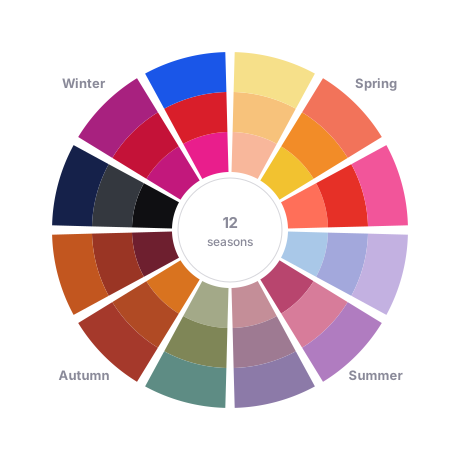
Choose a photo
Runs in your browser. Your photo is analyzed on this device and is not uploaded.
- Best: natural daylight, facing the window, no filter.
- Bare skin or light makeup; hair pulled back from the forehead.
- One person, face straight to the camera.
How color season analysis works
Color analysis sorts people into seasonal palettes by three traits of their natural coloring: undertone (warm or cool), depth (light or deep) and softness (muted or bright). Spring and Autumn lean warm, Summer and Winter lean cool. Each family then splits into three, which gives twelve seasons in total.
This tool reads those traits from your photo. It samples the skin on your cheeks and forehead, the iris, and the hair above your hairline, corrects for a color cast in the picture, and converts the samples to a perceptual color space. The warmth of the skin sets the undertone, its lightness sets depth, and its color intensity plus the contrast with hair and eyes sets softness.
The twelve seasons
Spring
Light Spring, Warm Spring and Clear Spring. Warm-leaning colors with a fresh, sunny feel, from peach pastels to bright coral.
Summer
Light Summer, Cool Summer and Soft Summer. Cool, gentle colors, from powder blue and lavender to dusty rose and slate.
Autumn
Soft Autumn, Warm Autumn and Deep Autumn. Earthy, golden colors such as olive, rust, terracotta and chocolate brown.
Winter
Deep Winter, Cool Winter and Clear Winter. Crisp, high-contrast colors, from emerald and cobalt to true red and icy white.
Getting a more reliable result
Lighting changes color more than most people expect. Take the photo facing a window in daylight, turn off any filter or beauty mode, and wear little or no makeup. Pull hair away from your forehead so the hair sample comes from your real hair color, and avoid strongly colored walls or clothing close to your face. Try two or three photos; if the season changes between them, treat the neighboring seasons as your range rather than a single answer.
Questions
Is this a professional color analysis?
No. It is an automated estimate from one photo. A trained analyst drapes fabrics against your face in controlled light, which a photo cannot replace.
Does it upload my photo?
The season analysis runs in your browser and does not upload your photo. You can clear the photo from memory at any time with the Clear photo button.
Why did I get a different season on another photo?
Light color, camera white balance and makeup shift the sampled colors. Neighboring seasons share many colors, so a small shift can move the result. Compare the runner-up season with the palette in a mirror.
Can I wear colors outside my palette?
Yes. A palette is a guide for what sits closest to your face, not a rule. Colors outside it work better in trousers, skirts, shoes or bags, or when softened with a scarf or collar in a palette shade.
Does it work for every skin tone?
It reads the colors in your photo regardless of tone, but any automated method can be less steady at the extremes of light or dark skin, especially in poor lighting. Use the palette as a starting point and trust what looks good on you.